
How to Convert Text to Transparent PNG Online for Free
Layam Game Studio · August 16, 2026Whether you're building a thumbnail, a presentation slide, or a logo mockup, sooner or later you need text on its own — no background, no box, just clean typography you can drop onto anything. That's exactly what a text to PNG converter is for: type a word, style it, and export it as a transparent PNG ready to layer over any image or video. Here's how to do it online, for free, with Sticker Studio.
Step-by-Step Guide: Generating Transparent PNG Text in 3 Clicks
The fastest path from idea to downloaded file is genuinely three actions:
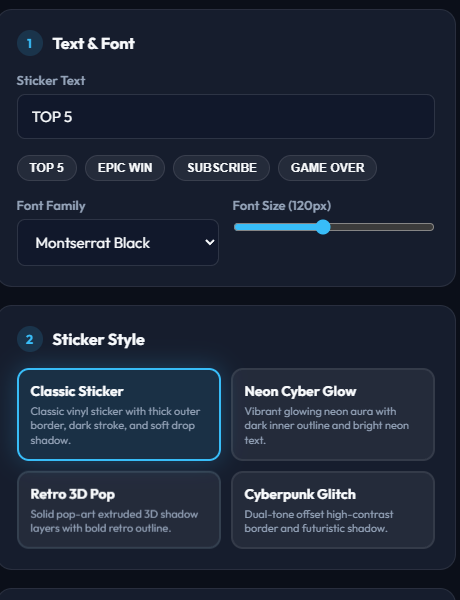
- Type your text. Open Sticker Studio and enter your word or short phrase into the Sticker Text field. The canvas updates live as you type.
- Click a style. Pick one of the built-in Sticker Style cards — the look applies instantly to your text.
- Click Download Transparent PNG. The file saves straight to your device with a true transparent background (alpha channel), no watermark.
That's the whole conversion — text in, transparent PNG out — with no account, no upload, and no waiting on a server to process anything.
Customizing Your Output (Font Sizes, Colors, Outlines & Drop Shadows)
The 3-click path gets you a finished PNG fast, but you have full control if you want to fine-tune it first:
- Font Family & Font Size — choose between Montserrat Black, Anton, Outfit Bold, and Pacifico, then scale the text with the size slider.
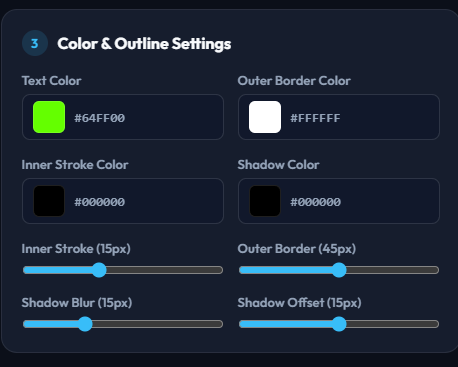
- Text Color — set the exact fill color of the letters with a color picker or hex value.
- Outer Border & Inner Stroke — control both the color and thickness of the outline around your text independently.
- Drop Shadow — set shadow color, blur radius, and vertical offset to lift the text off whatever background you place it on.
Every adjustment renders instantly in the live preview, so you can see exactly what you're exporting before you download it.
Why Use a Browser-Based Converter Instead of AI or Heavy Software?
There are three common ways to get styled text on a transparent background: open Photoshop or GIMP and build it manually, ask an AI image generator to "draw" the text, or use a purpose-built browser tool. The first two both have real downsides for this specific job:
- Heavy software means an install, a learning curve, and minutes of manual layer work for something that should take seconds.
- AI image generators render text as pixels guessed from a prompt — letters can come out misspelled, warped, or subtly wrong, because the model isn't typesetting real fonts.
- A browser-based converter like Sticker Studio renders your exact characters in a real font, so every letter is correct, crisp, and editable right up until you hit download.
It also runs 100% client-side — your text and settings never leave your browser — so it's instant and private, with nothing to install and nothing to sign up for.
Frequently Asked Questions About Text to PNG Conversion
Is it really free?
Yes. There's no account, no paywall, and no watermark on the downloaded file.
Is the background actually transparent?
Yes — the download is a genuine transparent PNG with an alpha channel, not a white or checkered background baked into the image. You can toggle the preview between a checker pattern and a solid dark background to double-check before you download.
Can I use the PNGs commercially?
Yes — anything you create with your own text and settings is yours to use, including in commercial projects.
Does it work on mobile?
Yes, the tool is fully responsive and works in any modern mobile browser.
Do I need to install anything?
No — it runs entirely in your browser tab. Nothing to download or install.
Ready to convert your own text to a transparent PNG?
Open Sticker Studio →